 SAMPLED
What Are MIDI Note Numbers, and How Do You Use Them?
Find middle C in your DAW, use our downloadable 0–127 chart, and learn how MIDI note numbers power synths, samplers, drum maps and audio apps.
Your DAW might call middle C C3, while a chart calls it C4. That does not necessarily mean either one is playing the wrong octave. The reliable reference is the number underneath the name: MIDI note 60.
MIDI note numbers connect keyboards, piano rolls, drum pads, samplers and software instruments. For musicians, they remove ambiguity when sharing parts or mapping sounds. For audio developers, they provide a consistent way to turn performance events into oscillator pitches, sample playback and voice allocation.
Here is how the numbering works, how to find middle C in your setup, and how to use the full downloadable chart below.
What is a MIDI note number?
In MIDI 1.0, a note number is an integer from 0 to 127 identifying a note in a Note On or Note Off message. That is 128 possible note numbers, not 127. Moving up by one number means moving up one semitone in the usual chromatic pitch mapping; adding twelve moves up one octave.
For example, 60, 61 and 62 correspond to C, C♯/D♭ and D in the octave containing middle C. 72 is the C one octave above 60. The MIDI Association’s message summary (opens in a new tab) documents the note-number and velocity fields.
MIDI is not audio. A note message tells a receiving instrument what happened. It does not contain a recording of a piano or dictate a particular timbre. The same note number can play a synth pitch, trigger a snare sample, select an articulation or launch a clip, depending on the receiving device’s mapping.
Is middle C MIDI 60, C3 or C4?
Middle C is MIDI note 60. Its displayed octave label depends on the software or hardware convention.
Our chart uses C4 for note 60, the scientific-pitch naming convention. Apple’s Logic documentation describes C3/Yamaha and C4/Roland display settings; under the C3 setting, the same note 60 appears as C3. Changing the display convention does not transpose the MIDI performance.
| Reference | Meaning |
|---|---|
| MIDI 60 | Stable note-number reference for middle C |
| C4 in this chart | The chart’s name for MIDI 60 |
| C3 under Logic’s C3/Yamaha setting | Another name for the same MIDI 60 |
| About 261.63 Hz | Middle C under equal temperament with A4 tuned to 440 Hz |
See Logic’s note-event documentation (opens in a new tab) and general display settings (opens in a new tab) for the distinction. Other DAWs and plugins can use their own labels: check the number rather than assuming a C3 label always means the same pitch everywhere.
How do you find middle C in your own DAW?
- Open a MIDI track and an event list or MIDI monitor. Use a view that reports the actual note number, not only the octave name. If your DAW lacks one, a MIDI-monitor utility or plugin can help.
- Record a short note from your controller. Check its number. If it is not 60, adjust the controller’s octave setting or select a different key until you send 60.
- Find that event in the piano roll. Note which C label your DAW displays. That is your setup’s displayed middle C.
- Check the receiving instrument. Track transposition, MIDI effects, sampler root settings and plugin tuning can change the result after the event is recorded.
- Use a simple pitched patch if you check by ear or tuner. An untransposed oscillator or piano patch is clearer than a drum sample, octave-layered synth or keyswitch instrument.
If the event is 60 but you hear a pitch an octave away, do not immediately blame the piano-roll label. Check processing and the instrument’s patch. A naming difference and a real transposition are different problems.
How do you read the MIDI note-number chart?
The chart covers all 128 numbers, 0–127. Each cell places the MIDI number above its note name. Columns follow the twelve pitch classes from C through B; rows follow the chart’s octave naming.
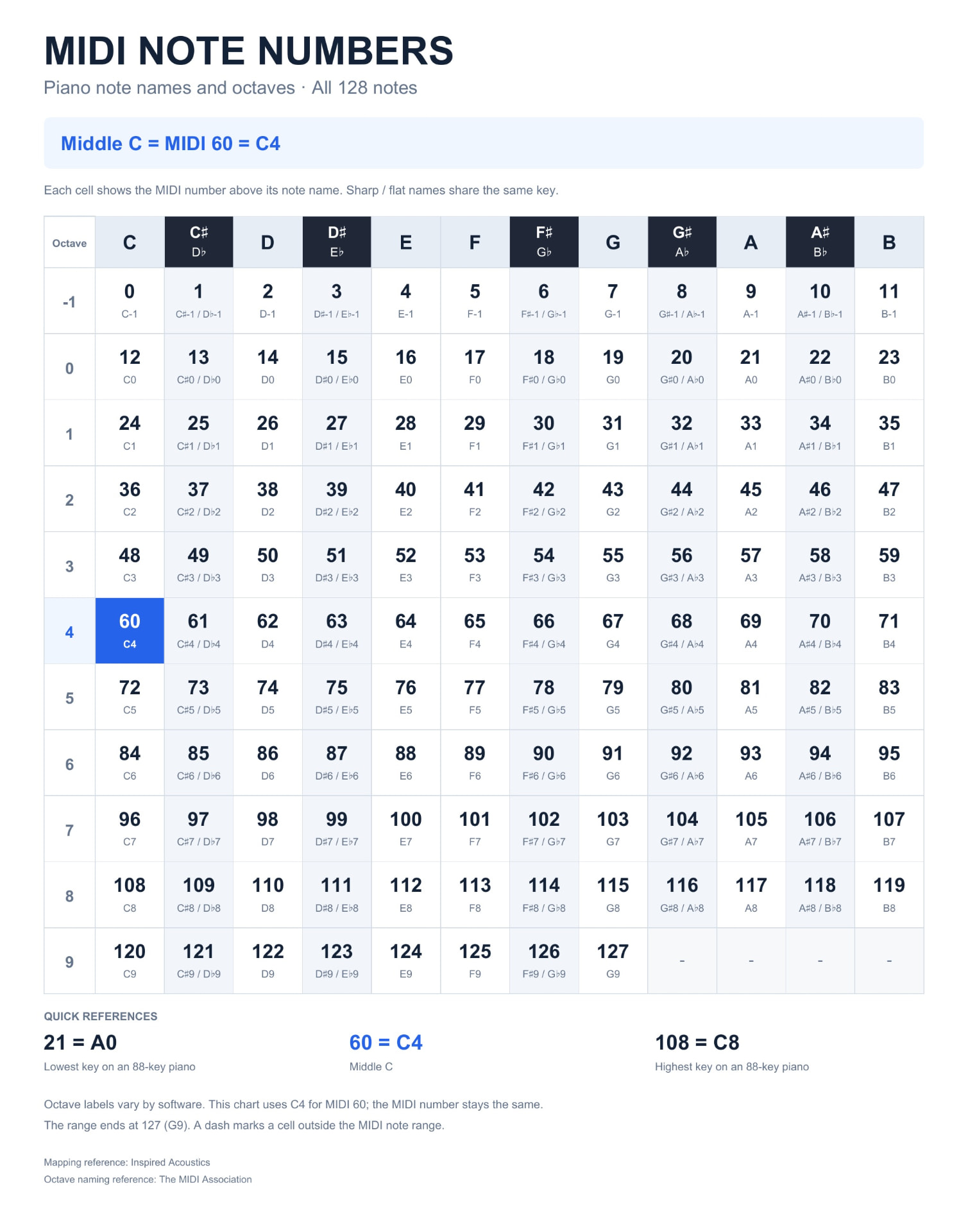
Download the full-size MIDI note-number chart (JPEG)
Chart: Robert Anthony / Sampled. Octave labels use C4 for MIDI 60; other software may display different octave names without changing the numbers.
To look up F♯4, find the octave-4 row and the F♯/G♭ column: 66. To look up 93, find its cell: A6 under this chart’s convention.
The dashes after 127 are outside the MIDI note-number range. A standard 88-key piano spans MIDI 21 through 108, A0 through C8 in this naming convention. MIDI’s full range extends beyond that piano keyboard.
Sharp and flat spellings such as C♯ and D♭ share a number in the standard mapping. A MIDI 1.0 Note On event does not preserve whether a composer meant a sharp or a flat; notation software needs musical context to choose a spelling.
Which MIDI numbers are useful to memorize?
| MIDI number | Name in this chart | Frequency at A4 = 440 Hz | Useful reference |
|---|---|---|---|
| 21 | A0 | 27.50 Hz | Lowest key of a standard 88-key piano |
| 36 | C2 | 65.41 Hz | Low C; also a common drum-trigger number |
| 48 | C3 | 130.81 Hz | One octave below middle C |
| 60 | C4 | 261.63 Hz | Middle C |
| 69 | A4 | 440.00 Hz | Standard tuning reference used here |
| 72 | C5 | 523.25 Hz | One octave above middle C |
| 108 | C8 | 4186.01 Hz | Highest key of a standard 88-key piano |
| 127 | G9 | 12543.85 Hz | Highest MIDI note number |
These frequencies assume 12-tone equal temperament and A4 = 440 Hz. Alternate tuning, pitch bend, sample tuning and instrument transposition can change the sound. A percussion sound triggered by note 36 is not required to have a 65.41 Hz fundamental.
How do producers use MIDI note numbers?
Transpose melodies and build chords
Add 12 to every note to move a part up one octave; subtract 12 to move it down. Add 7 for an equal-tempered perfect fifth. Check the 0–127 boundary before moving a whole part.
A C-major triad can be represented as 60, 64, 67. C minor is 60, 63, 67. Move the major triad up two semitones and you get 62, 66, 69, a D-major triad.
The same arithmetic helps sequencers, arpeggiators, chord generators and scale-constrained editing. Our major-scale piano guide and natural-minor piano guide explain the musical patterns behind those numbers.
Map drum pads and exchange drum parts
Under General MIDI Level 1, percussion is assigned to channel 10, with standardized drum-note assignments. Familiar examples include 36 = Bass Drum 1, 38 = Acoustic Snare, 42 = Closed Hi-Hat and 46 = Open Hi-Hat.
Those are General MIDI mappings, not universal laws for every drum plugin. A custom kit may place the kick on a completely different number. Before exchanging a drum MIDI file, share the receiving kit’s map or remap the notes. Matching note names alone is risky when octave labels differ.
The MIDI Association’s General MIDI reference (opens in a new tab) explains the standard. For tuning the actual sounds rather than their triggers, see our kick-and-snare frequency guide.
Set sampler roots and key zones
A sampler’s root note identifies the key that plays a pitched sample at its intended original pitch. If your sample is a tuned middle C, assigning root 60 provides a clear reference. Notes above or below it can then transpose the sample.
Do not label every sample C by habit: a recording of A needs its actual pitch identified and its root set accordingly. Drum hits or noisy textures may not have a useful single pitch at all.
Key zones use number ranges to decide which sample plays. One recording might cover 48–59, another 60–71. Velocity layers add a separate condition; they are not additional note numbers. Share the root number as well as the label when moving instruments between samplers.
Trigger articulations, clips and other commands
Sample libraries may use low notes as keyswitches for legato, staccato or other articulations. Performance rigs can map note messages to clips, lighting cues or video events. In those cases, the number selects an action rather than an audible musical pitch.
Keep trigger notes outside your intended playing range where possible, and document the mapping. An accidental keyswitch in a melody can change an articulation instead of sounding a note.
How are MIDI note numbers used in audio development?
Convert notes into oscillator frequencies
For equal temperament with MIDI 69 tuned to 440 Hz:
frequency = 440 × 2^((note − 69) / 12)
A small JavaScript function makes the relationship explicit:
function midiNoteToHz(note) {
  if (!Number.isInteger(note) || note < 0 || note > 127) {
    throw new RangeError("MIDI note must be an integer from 0 to 127");
  }
  return 440 * 2 ** ((note - 69) / 12);
}

midiNoteToHz(60); // approximately 261.6256
midiNoteToHz(69); // 440
midiNoteToHz(72); // approximately 523.2511
An oscillator API generally wants hertz, not the MIDI number itself. Setting its frequency to 60 would generate 60 Hz, not middle C. In Web Audio’s OscillatorNode (opens in a new tab), frequency is an audio parameter expressed in hertz.
Calculate sample playback ratios
For a simple resampling sampler, the playback-speed ratio is:
ratio = 2^((targetNote − rootNote) / 12)
If the root is 60, playing 72 gives a ratio of 2: one octave up, twice the playback speed and half the original duration. Playing 48 gives 0.5: one octave down, half speed and twice the duration.
This describes basic resampling, not a time-stretching algorithm that preserves duration. A pitch-shifting sampler may use a different processing path. AudioBufferSourceNode’s playbackRate documentation (opens in a new tab) explains the speed/resampling behavior in Web Audio.
Parse note events and manage voices
A synth needs more than a pitch conversion. It must connect Note On events to voices and handle releases, sustain, envelopes and repeated notes.
For a MIDI 1.0 channel message, the status byte identifies the message type and channel. A basic three-byte example is:
- 0x90, 60, 100: Note On, channel 1, note 60, velocity 100.
- 0x80, 60, 64: Note Off, channel 1, note 60, release velocity 64.
- 0x90, 60, 0: Note On with zero velocity, treated as Note Off.
User-facing channels 1–16 are encoded 0–15 in the status byte. A developer who forgets that offset can route a performance to the wrong part.
Identify notes by channel and note number, and plan for overlapping repeated Note Ons on the same channel/note. A single global “current note” variable is not a polyphonic voice manager. Sustain pedal and envelope release also mean that receiving a Note Off need not immediately silence the audio.
A parser consuming a raw MIDI byte stream must also handle framing and running status; these three examples are not a complete parser. The expanded MIDI 1.0 message list (opens in a new tab) is the reference for message fields.
Build browser instruments and MIDI tools
Web MIDI handles access to MIDI inputs and outputs and the exchange of MIDI messages. Web Audio generates, processes and routes audio. A browser synth can use the first to receive note events and the second to produce sound, but neither is a replacement for the other.
Check browser support and permissions before designing a device-connected tool. For audio processing, timing matters as much as note math: schedule events deliberately, and avoid treating interface-update timing as a precise audio clock.
Start with the Web MIDI API (opens in a new tab) and Web Audio API (opens in a new tab) documentation.
What should you not confuse with a MIDI note number?
- Velocity: in MIDI 1.0, a separate value describing a note’s attack or release; an instrument decides how it affects sound.
- Channel: routes a message to a part. Note 60 on two different channels can control two different instruments.
- Control Change number: identifies a controller function. CC 64 is sustain pedal; note 64 is E above middle C in this chart. The shared integer does not make them the same message.
- Program Change: selects a program or patch according to the receiving device; it is not a pitch.
- Pitch bend: changes pitch according to the instrument’s bend range without replacing the original note number.
- Frequency: measured in hertz. MIDI provides the event reference; tuning and sound generation determine the output.
What changes with MIDI 2.0 and microtonal instruments?
MIDI 2.0 does not turn this chart into a list of millions of new note numbers. MIDI 2.0 Channel Voice note messages retain the 0–127 note-number field, while higher-resolution values and per-note capabilities provide richer control. Its message encoding is not the same as the three-byte MIDI 1.0 examples above.
Microtonal instruments can use tuning systems and pitch-control methods to produce pitches between the conventional semitone positions. A note number remains a useful reference, but it is not a guarantee that the instrument will use the equal-tempered frequency table. See the MIDI Association’s MIDI 2.0 overview (opens in a new tab).
A quick MIDI troubleshooting checklist
When a part sounds wrong, check these separately:
- Number: is the event actually the note you intended?
- Label: is the apparent octave mismatch only a naming convention?
- Channel: is it reaching the intended instrument or drum part?
- Mapping: is the number a pitched note, drum trigger or keyswitch?
- Transposition and tuning: is something changing pitch after the event?
- Note release: are Note Off, zero-velocity Note On and sustain handled correctly?
If you are choosing hardware to send these events, our MIDI keyboard explainer covers the difference between a controller and a sound-producing instrument.
Frequently asked questions
Is middle C always MIDI note 60?
Yes, 60 is the standard MIDI reference for middle C. C3 or C4 can be a display convention, and the receiving instrument can still transpose or retune the sound.
How many MIDI note numbers are there?
There are 128, numbered 0 through 127. Zero is a valid note number, not an empty value.
Does MIDI note 36 always play a kick?
No. General MIDI assigns Bass Drum 1 to note 36 on its percussion channel, but other instruments and custom drum maps can use that number differently.
Can two notes have the same MIDI number?
Enharmonic names such as C♯ and D♭ share a number in the standard chromatic mapping. Two simultaneous performances can also use the same number on different channels—or repeat it on one channel—so number alone is not always enough to identify a voice.
Does changing an octave label change the music?
Changing a naming/display preference does not transpose the notes. An octave-transpose control does. Use the event’s MIDI number to tell which change happened.