 SAMPLED
What Is StemTab, and How Can It Help You Learn a Song?
StemTab combines stem separation and editable notation for listening, practice and export. Here is how its workflow, Web pricing and mobile options fit together.
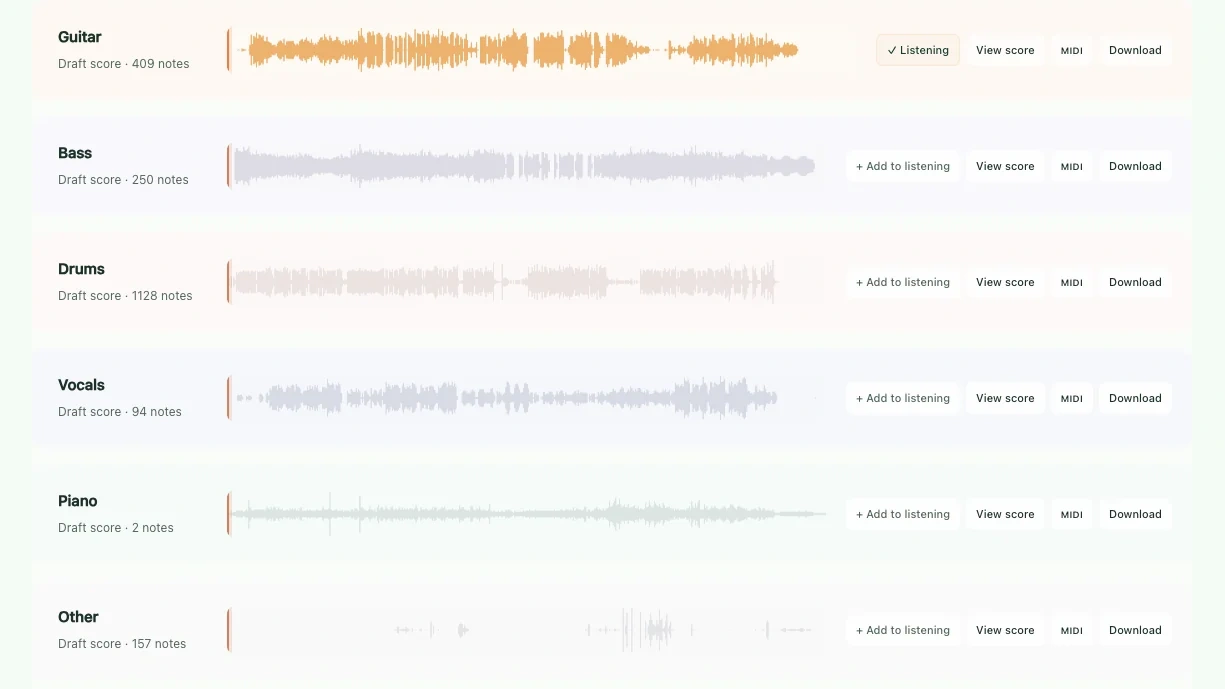
Learning a song by ear often starts with a small frustration: you can hear the part you want to understand, but the rest of the recording keeps getting in the way. A bass line disappears beneath the kick. A guitar phrase is buried under the vocal. You want to study the musical idea—not spend the whole session guessing what is happening inside the mix.
StemTab (opens in a new tab) brings stem separation and music transcription into one workspace. It separates a recording into parts, turns detected notes into an editable score draft, and lets you follow the audio and notation together. The point is not just to pull a song apart. It is to give musicians a more useful starting point for listening, practicing and continuing their own work.
Coverage note: This feature is based on StemTab’s official product information, checked November 7, 2026, rather than a hands-on review. Screenshots come from its official website.
What does StemTab do?
StemTab combines two jobs: stem separation, which isolates parts of a recording, and automatic transcription, which identifies notes and creates a score you can inspect and edit.
According to its official product page (opens in a new tab), you upload an audio or video file, choose separation or transcription, follow processing progress, then listen and correct the result before exporting.
The separation options are two stems—vocals and accompaniment—or six parts: vocals, guitar, bass, drums, piano and other. Those are the advertised categories, not a promise that every individual instrument or performer gets its own perfectly isolated track.
| What you want to do | Relevant StemTab feature |
|---|---|
| Hear a bass line without the full arrangement competing with it | Isolate and solo the bass stem |
| Practice alongside the rest of a recording | Mute the part you want to play |
| Investigate notes in a performance | Generate and edit a score draft |
| Follow notation while listening | Synchronized score, waveform and playback position |
| Continue in another music workflow | Export audio, PDF, MusicXML, MIDI or a project file |
That connection between hearing and seeing is the interesting part. An isolated instrument helps you focus on a phrase; a score draft gives you something concrete to check against what you hear.
How can isolated stems help you practice?
For a guitarist, soloing the guitar part lets you focus on the shape and timing of a phrase. Muting it creates a different exercise: play your version against the remaining arrangement and listen for whether you land in the pocket.
A bassist can investigate where notes change, where a line leaves space, and how it interacts with the drums. A singer might focus on the vocal, then return to the accompaniment to practice entrances and phrasing.
These are practical ways to use the advertised solo and mute controls—not claims that separation recreates the original multitrack session. Start with a short passage and compare it with the full recording. Hearing a sound in context remains part of learning it.
If you are learning the fretboard alongside songs, our A minor guitar lesson and C minor guitar lesson offer checked scale patterns you can practice independently of an automatically generated score.
What happens after StemTab transcribes the music?
StemTab describes its automatic notation as an editable draft. The score follows playback, and the workspace lets you correct pitch, note duration and rests while listening.
That creates a useful learning loop:
- Choose a short phrase you want to understand.
- Listen to the relevant stem and identify its important notes or rhythm.
- Follow the draft score through that phrase.
- Correct what does not match the audio.
- Play the passage yourself, then check it again in the full arrangement.
The company says accuracy depends on recording quality, mix density and playing style. Treat the result as a starting point you can verify, rather than sheet music you assume is already finished.
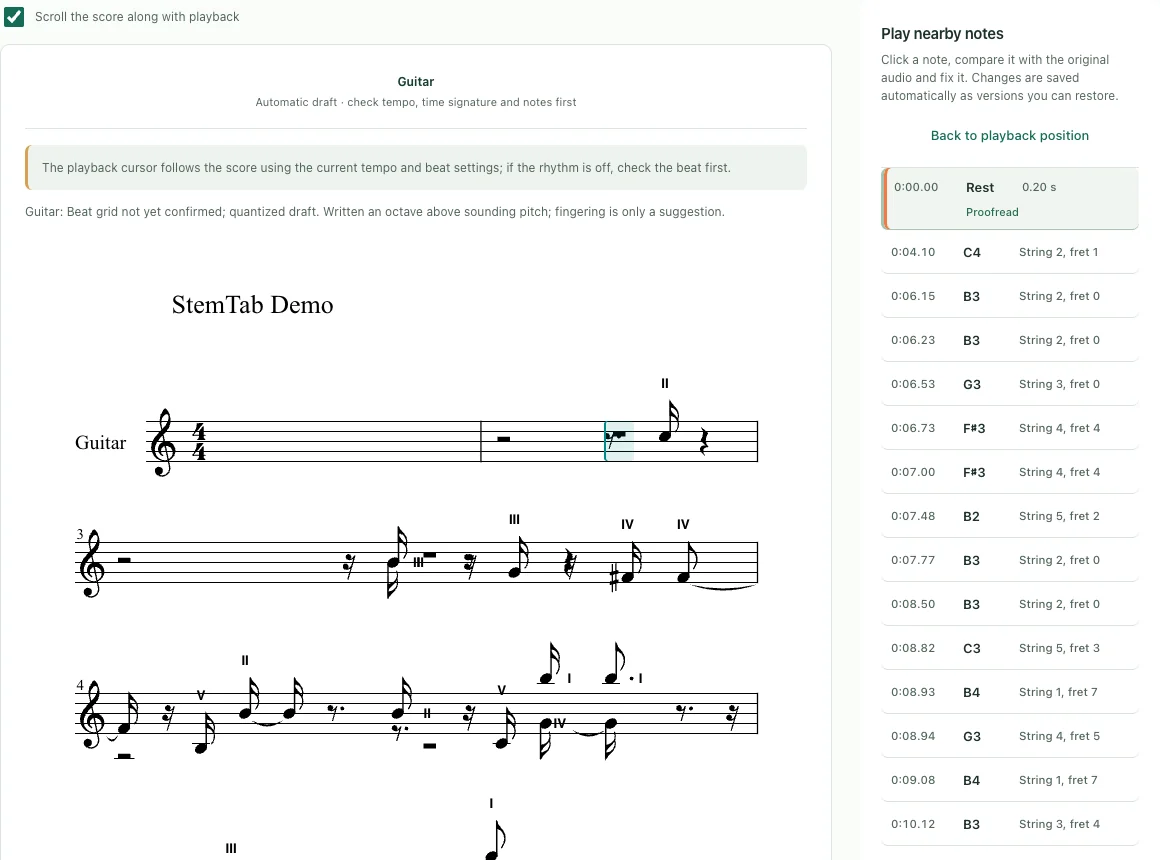
Screenshot: StemTab’s official score-view demo. Automatic transcription produces an editable draft. Source: StemTab (opens in a new tab).
If you export MIDI, our MIDI note-number guide explains why middle C is note 60 even when programs use different octave labels.
Does StemTab make guitar tabs?
No. Despite the name, StemTab explicitly says it does not generate guitar tablature. It produces standard notation and MIDI, not six-line TAB with string and fret positions.
You can use its guitar stem to listen closely and its score draft to investigate notes, but you need a separate tablature resource if fret-number notation is your goal.
Our guide to finding guitar tabs covers outside resources and Sampled’s downloadable scale diagrams. StemTab is a listening-and-transcription tool alongside those resources, not a replacement for a guitar-tab library.
What can you export?
StemTab lists separated audio, printable PDF, MusicXML, MIDI and project files. Its pricing page (opens in a new tab) specifies MP3, WAV and FLAC audio downloads.
| Export | Useful next step |
|---|---|
| Separated audio | Listen to an isolated part or continue with audio in compatible software |
| Print or read the corrected notation | |
| MusicXML | Move notation into compatible score-editing software |
| MIDI | Work with note events in compatible music software |
| StemTab project | Keep a project file for the StemTab workflow |
MIDI does not contain the original singer’s voice or recorded guitar tone. It carries musical event data that compatible software can play through an instrument. Choose separated audio when you want to keep the actual audio result.
Where can you use StemTab?
The official site lists a browser-based Web Studio and iPhone and iPad apps, with a Mac download coming soon as of November 7, 2026. The App Store listing (opens in a new tab) is its linked destination for the mobile app.
The company distinguishes processing this way:
- Native apps: process and store projects on the device by default, without an account.
- Web Studio: processes audio in the cloud.
The browser workspace offers an entry point without waiting for the Mac download. The native mobile workflow is the option the company describes for on-device processing. Do not assume the browser version processes locally because you opened it on your own computer.
Is StemTab free, or do you pay to export?
The Web version charges by processing minutes, without a subscription. Purchased minutes accumulate and do not expire.
Each verified email receives a one-time five-minute free preview allowance for the Web app. Exporting and downloading require a paid package: the allowance previews the workflow rather than providing five minutes of free downloadable stems.
The official Web pricing page (opens in a new tab) lists these U.S.-dollar packages:
| Web package | Listed price | Processing minutes | Project retention |
|---|---|---|---|
| Starter | $9.98 | 15 | 7 days |
| Creator | $25.98 | 45 | 30 days |
| Studio | $69.98 | 150 | 90 days |
Minutes not expiring is different from projects being stored forever. Each project has a storage deadline; download what you want to keep. Storage uses the highest purchased tier, and capacities do not stack.
Paid processing is charged once by source duration. The company says failed or cancelled tasks return reserved time and repeated exports of an unlocked result do not consume more minutes. Taxes and the final total appear at checkout.
iPhone and iPad pricing is shown on the App Store. Web allowances and mobile pricing should not be treated as interchangeable.
Who is StemTab worth a look for?
StemTab’s clearest appeal is to musicians who want to move between listening to a part, understanding its notes, and practicing or editing it without treating those as unrelated tasks.
A learner can investigate a phrase. A teacher can explore a passage with a student. A producer can inspect an idea and choose an audio or note-based export for the next stage. These are possibilities built around the stated features, not a guarantee of perfect results on every recording.
Use recordings you own or have the right to process. Separating a commercial song does not give you permission to release its stems, distribute its score or reuse its recording in a new track. Our sample-clearance guide explains the difference between studying music and clearing material for release.
For a first look, open the StemTab Web Studio (opens in a new tab), use the official demo or a short recording you have permission to upload, and pick one question: what is the bass doing, which notes form that phrase, or where does the part enter? That is where this combination becomes useful—turning a crowded recording into something you can work through, one part at a time.