 SAMPLED
How Do You Start Music Production for Free?
A zero-cost path from your first beat to a finished song: free DAWs, free sounds, a simple workflow and the free tools worth adding next.
Disclosure: The Author owns Sampledex (DBA) and separately owns and operates Sampled. Sampled is a separate business and is not a division, product, or subsidiary of Sampledex or its parent company.
You don't need a studio, a paid DAW or a pile of plugins to start making music. A laptop, phone or tablet, a pair of headphones and some free software are enough to learn the whole process: making sounds, arranging them into a song and exporting a finished track.
Here's a practical, zero-cost path from your first beat to your first finished song.
What do you actually need to start producing music?
- A computer, phone or tablet you already own.
- Headphones or earbuds. Any pair works to start. Wired ones avoid Bluetooth delay when you play notes in.
- A free DAW (digital audio workstation), the app where you record, arrange and mix.
- Free sounds: built-in instruments, free synths and royalty-free samples.
A MIDI keyboard and studio monitors are nice later, but you can click notes in with a mouse and learn everything else first.
Which free DAW should you pick?
Pick one and stick with it for a few months. Learning one app deeply beats hopping between five.
| DAW | Platforms | Good for |
|---|---|---|
| GarageBand (opens in a new tab) | Mac, iPhone, iPad | Apple users who want loops, instruments and recording out of the box |
| BandLab (opens in a new tab) | Browser, iOS, Android | Starting on any device, including a Chromebook or phone |
| Waveform Free (opens in a new tab) | Mac, Windows, Linux | A full desktop DAW with no track limits |
| Sampledex (opens in a new tab) | Mac (Apple Silicon), Windows beta, iPad | Beatmaking and sample-based production (more below) |
For a deeper comparison, see our guide to the best free DAWs going into 2027.
Where do you get free sounds?
- Built-in instruments. Every DAW above ships with drums, keys and synths. Use them before downloading anything.
- Free synths. Vital (opens in a new tab) has a free version, and Surge XT (opens in a new tab) is free and open source. Both run on Mac, Windows and Linux.
- Free samples. Freesound (opens in a new tab) hosts user-uploaded sounds, but every file has its own Creative Commons license, so check whether it needs credit or bans commercial use before releasing anything.
Our roundup of the best free synths goes further.
How do you make your first track?
- Set a tempo. Around 85 to 95 BPM suits hip-hop; 120 to 128 suits house.
- Program a drum pattern. Kick, snare or clap, and hi-hats. Loop four bars.
- Add a bass line that follows the kick.
- Add chords or a melody. Stay in one key; most DAWs have a scale or key helper.
- Arrange. Copy the loop into an intro, verse and chorus, then remove parts so sections feel different.
- Mix simply. Balance volumes, pan a few parts left and right, and keep the loudest moments below clipping.
- Export a WAV and listen on your phone, in the car and on earbuds.
Our step-by-step beginner beatmaking guide walks through each stage in more detail.
How do you learn faster without paying for courses?
- Recreate songs you love. Copy a drum pattern or chord progression by ear. It's the fastest way to learn arrangement.
- Finish small tracks. A rough 90-second song teaches more than a perfect eight-bar loop.
- Use the manual and official tutorials. Most free DAWs have free video walkthroughs from the developer.
- Learn basic theory. Our music production glossary explains the terms you'll keep running into.
- Share early. Post rough work for feedback from other producers.
What happens when you want more tools?
Once you know your DAW, add tools one at a time based on a real problem in your music, not a sale. A new synth won't fix an arrangement, but learning to arrange will improve every track you make.
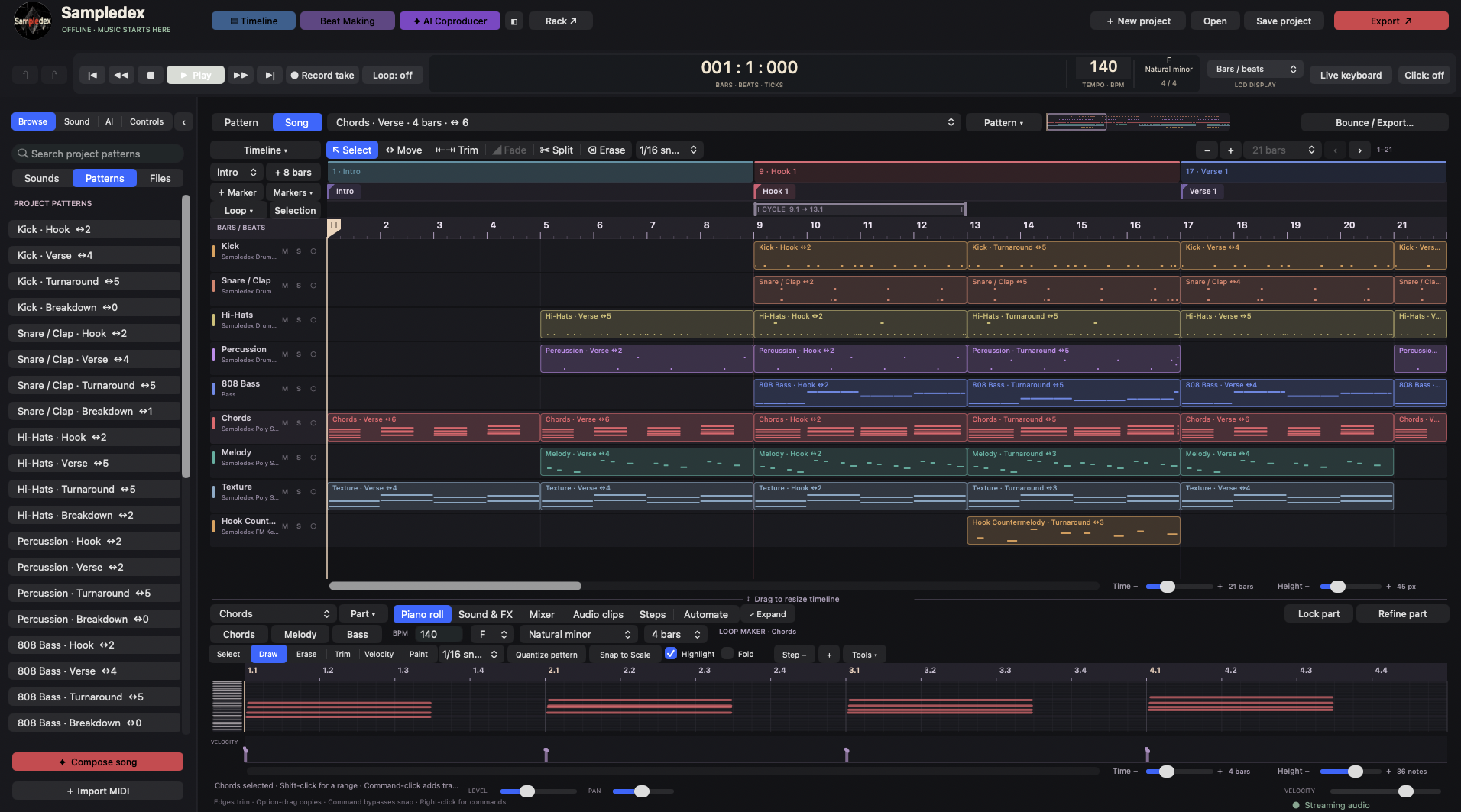 Screenshot: Sampledex
Which free Sampledex tools can you use to start?
This is where Sampledex comes in. It's a DAW made by sample makers, for sample makers, and everything below is free.
- Sampledex DAW (opens in a new tab). A free beta DAW built around beatmaking and sample flipping: step-lane drums with velocity, timing and ratchets, a piano roll with key and scale tools, Sampledex Sampler for loading and tuning your own sounds, VST3 and Audio Unit plugin support, and WAV or AIFF export. It runs on Apple Silicon Macs, with Windows in beta. Read our full Sampledex overview.
- Sampledex for iPad. Take your beats with you on a tablet.
- Sampledex Effect Shift (opens in a new tab). A free AUv3 multi-effect for iPhone and iPad with 50 effects, 51 factory presets and seven macro knobs for drive, delay, reverb, modulation and more. See our Effect Shift breakdown.
- Free Sampledex preset and sample packs. Free Vital lead and character presets plus an SFX pack are on sampledex.com (opens in a new tab). We cover them in where to get free Vital presets.
Once you've made a few beats, you can even turn your own sounds into packs. Our guide on how to make and sell sample packs shows how.
FAQ
Can you make professional music with free software? Yes. Free DAWs can record, arrange, mix and export full songs. Skill and finished tracks matter far more than price.
Do I need a MIDI keyboard? No. You can draw notes with a mouse or tap them on a touchscreen. Add a keyboard later if you want to play parts in.
Can I release music made with free samples? Usually, but check each sound's license. Some Creative Commons licenses require credit or forbid commercial use.
What's the best free DAW for beginners? The one that runs on the device you already own. GarageBand on Apple devices, BandLab on anything with a browser, and Sampledex if beatmaking with samples is your focus.