 SAMPLED
What's New in Sampledex 0.18.2, and Can You Now Switch the AI Off?
The free beatmaker DAW's September 23 update adds an AI On/AI Off choice at launch. Here's what changed, what hasn't, and who it's for.
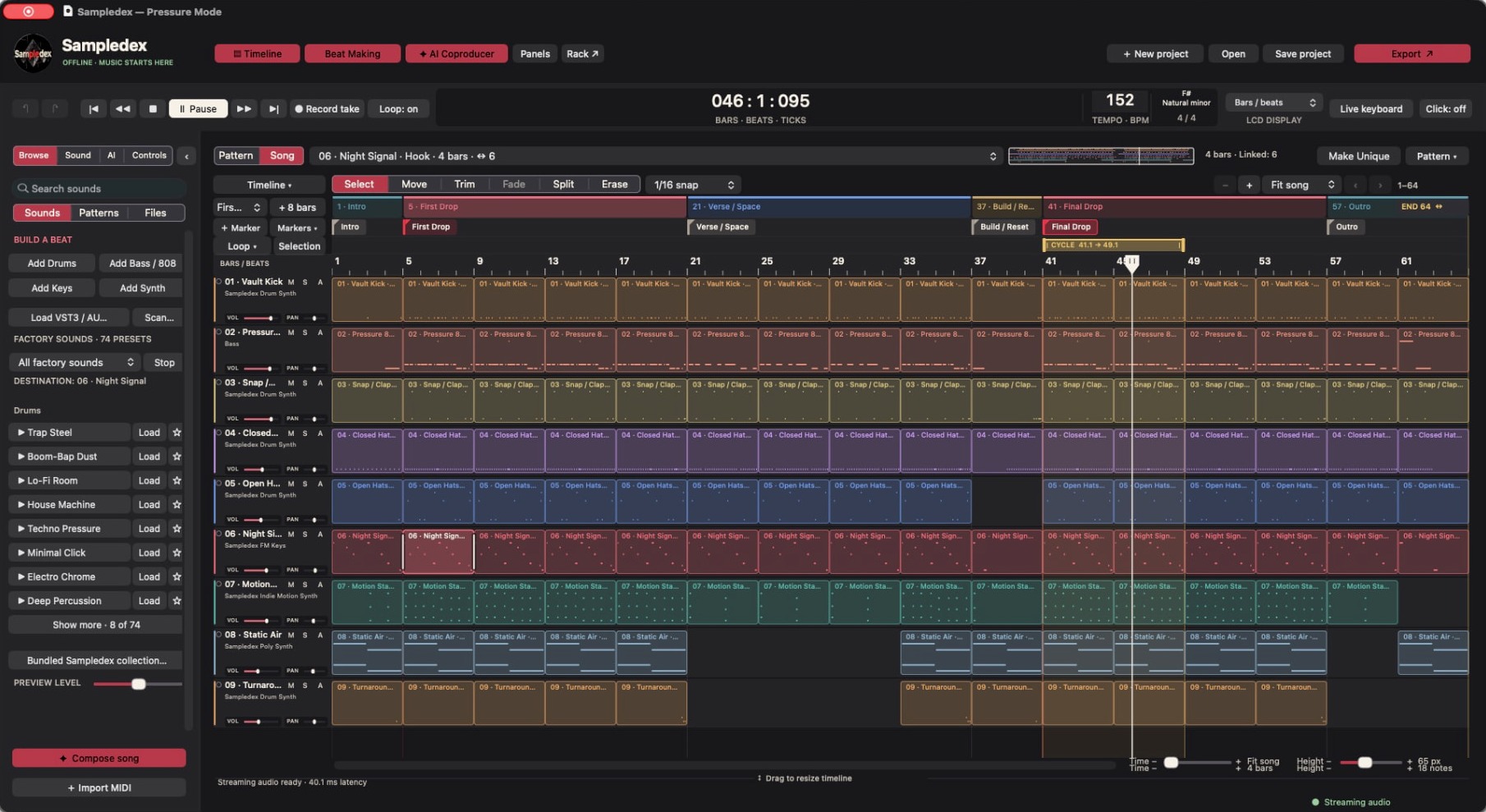
Most software updates add more AI. Sampledex 0.18.2 goes the other way. It lets you turn the AI off.
The free macOS DAW from the Sampledex team came out on September 23, 2026. The headline feature is small but it matters: when Sampledex starts, it asks whether you want AI On or AI Off, and then it remembers your choice. Just last week we covered the app in our guide to the best free DAWs. At that point it was on version 0.17.2. Here's what the jump to 0.18.2 means.
What does "AI Off" actually do?
The release notes say it directly: with AI off, "the generation tools are hidden — your instruments, saved sounds and manual editing stay right where they are." Nothing in your project gets removed. The coproducer panels just disappear from view.
That matters because the AI debate among producers is now about workflow and trust, not only about sound. Some producers want a sketchpad that can suggest a chord progression. Others want a DAW that never offers one. Before this update, you got the AI panels whether you wanted them or not. Now you choose once at startup, and you can change your mind later.
When the AI is on, it still works the way it did before. The built-in coproducer can suggest a song, a loop, or a new version of a part you've selected. You compare its idea with what you had, then keep it, edit it, or throw it out. Sampledex says the model "runs locally without Ollama, an external model host or an API key," so your sessions stay on your Mac. The company also still calls the coproducer "in development." If you're wondering where the legal lines are, read is AI music legal in 2026?.
What does the rest of the DAW look like now?
The basic idea hasn't changed: "a DAW made by beatmakers, for beatmakers." You still draw drums, shape bass lines, arrange patterns, and mix your track, all in one window.
- Steps and piano roll: Named drum lanes let you adjust note length, velocity, timing, and ratchets. The piano roll keeps the project's key and scale tools right next to the notes.
- Arrangement: You build songs from MIDI patterns and audio clips. Copies of a pattern stay linked, and Make Unique splits one copy off so you can change it without affecting the others. Section markers and a visible loop range make structure easier to see.
- Starting points: You can begin with a Blank project, Loop Maker, or a genre template, with or without demo music. There are Dark, Light, and Follow System appearance options.
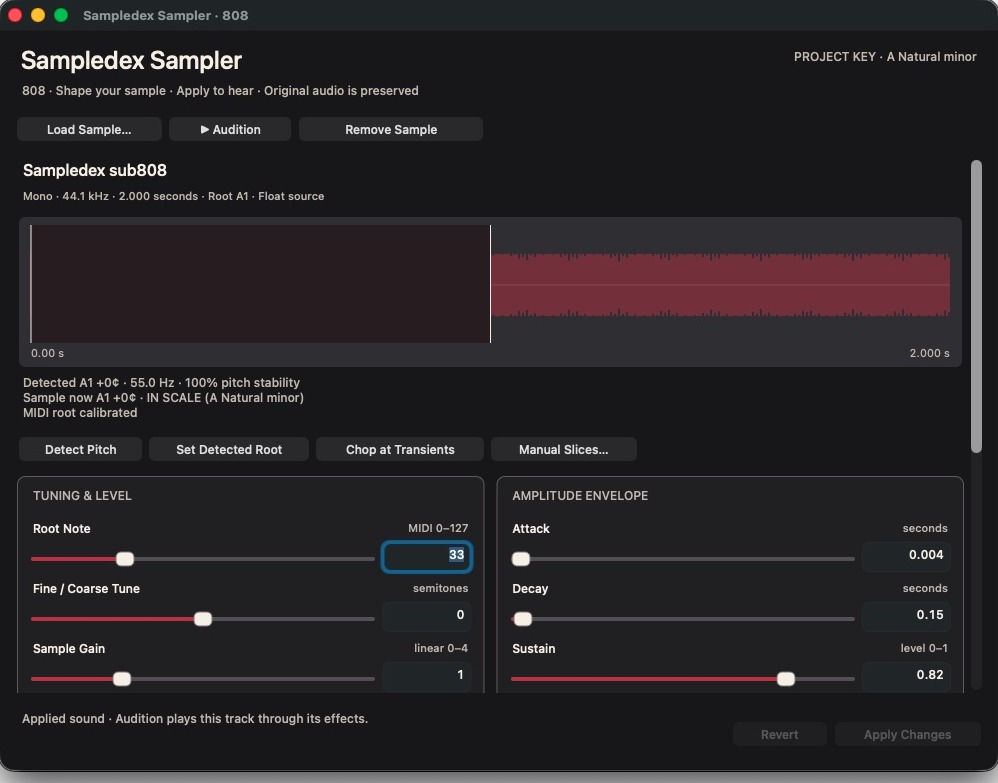 Sampledex Sampler. Screenshot: Sampledex
How good is the sampler?
The built-in Sampledex Sampler lets you set a sample's root note and tuning, remove a sample, shape envelopes, and run pitch analysis. The company is honest about its limits: pitch detection "is an estimate — check it by listening." For 808s and chopped loops, trust your ears over the readout. That's good advice in any DAW.
Along with the sampler, the app includes Sampledex FM Keys and the Sampledex Indie Motion Synth. It also supports third-party plug-ins in native Apple Silicon VST3 and AU v2 formats. VST2, Intel bridging, and AUv3 are not supported. If you need plug-ins to add, our free plug-ins list is a good place to start.
Can you mix and finish a track in it?
Yes. You get track levels, pan, inserts, shared sends, and an always-visible Master channel. You can draw automation too. Export options include a WAV or AIFF mixdown, a loop, or aligned stems. Projects save as a .sdxp package that keeps your original MIDI and audio, so you can come back and fix the mix later. When the mix is done, you're ready for distribution.
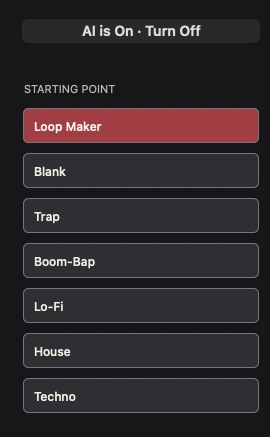 The new AI On / AI Off choice. Screenshot: Sampledex
What still can't it do?
Recording works, but it's basic: mono 44.1 kHz/16-bit takes from your system input. It can't do stereo or multichannel tracking. Vocal editing, cleanup, and tuning are planned for a future version aimed at artists and executive producers. It still runs only on Apple Silicon Macs with macOS 14 or later, and it's still in beta.
Who should download 0.18.2?
- Mac beatmakers who want a free, focused workspace: yes.
- Producers who stayed away because of the AI: this update was made for you. Choose AI Off and it's a regular pattern-based DAW.
- Vocal-heavy artists and Windows users: not yet.
It's still free. Try it for one beat and see if you finish that beat faster than you usually do. That's the only test that really counts.
FAQ
Is Sampledex 0.18.2 free? Yes. It's a free beta download from sampledex.audio.
Does AI Off delete anything? No. It hides the generation panels. Your instruments, saved sounds, and edits stay in place.
Does the AI need the internet? No. The included AI, instruments, and sounds work offline. You only need a connection to download the installer and view online media.
Does it run on Intel Macs or Windows? No. It runs only on Apple Silicon Macs with macOS 14 or later.