 SAMPLED
Sampledex Indie Verb 2.0 is a reverb built around ducking and Freeze
Sampledex's newest plugin is a reverb with early-reflection control, a built-in ducking circuit and a Freeze mode, in VST3 for Windows and VST3/AU for Apple Silicon. Here is what it does and how to dial it in.
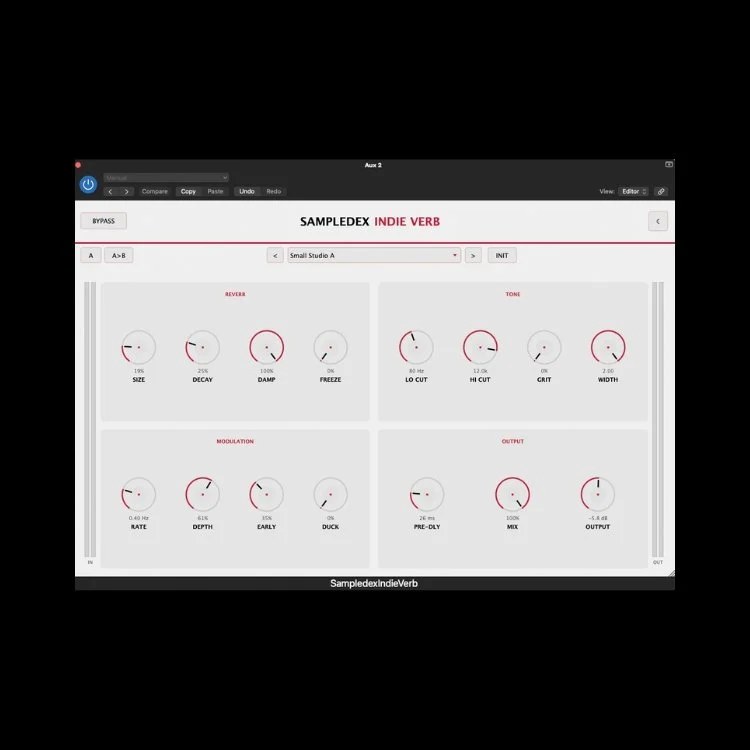
Sampledex (opens in a new tab) has been shipping in-house plugins at a steady clip this year — the Indie Motion Synth, the Redline EQ, the Saturator Pro — and the newest one in the store is Indie Verb 2.0, a reverb available now as a Windows x64 VST3 (opens in a new tab) and a macOS build for Apple Silicon (opens in a new tab) in VST3 and AU.
The pitch on the product page is short: "Create the space. Keep the clarity." The second half is the part worth paying attention to, because it is where most reverbs in this class fall down.
What is actually in it
The control set is bigger than the interface suggests:
- Size and Decay — the two macro controls, moving from tight studio ambience through mid-sized rooms to long atmospheric tails.
- Damp — rolls the high end off the tail so reflections soften as they die instead of hanging bright and brittle.
- Freeze — captures the current tail and sustains it indefinitely. This is the sound-design control: drones, transitions, ambient beds under a verse.
- Tone section — Lo Cut, Hi Cut, Grit for texture, and Width to widen or tighten the stereo image of the tail.
- Modulation — independent Rate and Depth, from barely-there chorusing to obvious pitch drift.
- Early reflections — a dedicated control for the first bounces, which is how you make a source feel close and immediate versus far back in the room.
- Ducking — the reverb pulls back while the source is loud and swells in behind it.
- Pre-Delay, Mix, Output — timing and gain staging.
- Workflow — preset browser, A/B compare, copy one state to the other, INIT to reset, plus light and dark themes.
Ducking is the headline, not Freeze
Freeze is the fun one. Ducking is the useful one.
The classic problem with reverb on a rap or indie vocal is that the tail masks the next syllable — you add space, you lose intelligibility, so you pull the send down and end up with a dry vocal glued to nothing. The usual fix is a sidechain compressor on the reverb bus keyed off the dry vocal, which means routing, a second plugin and a bus you have to maintain.
Indie Verb builds that in. Set your Mix, raise the ducking until the tail disappears under the lead words and blooms in the gaps, and you get a vocal that sits in a room without smearing. The same trick works on snares in a busy drum bus and on plucked guitars in a dense mix.
How to dial it in: push the reverb until it is obviously too loud, then increase ducking until the words punch through. You want the tail audible in the pauses and nearly gone under the phrase. Back the Mix off a few percent after — ducking makes reverb feel quieter than it measures.
A practical starting point for vocals
- Pre-Delay around 20–40 ms so the tail starts after the consonant, not on top of it.
- Size small-to-medium, Decay short. Space, not a cathedral.
- Lo Cut somewhere near 250–300 Hz to keep low mids out of the tail; Hi Cut to taste, with Damp handling the rest.
- Early reflections up for an intimate, close read; down for a distant, washed one.
- Ducking as above.
- Grit in small amounts if the vocal is clean and the track is not.
For a drum room, invert most of it: bigger Size, more early reflections, Damp higher, Width wide, ducking moderate so the tail breathes between hits.
Freeze as an arrangement tool
Freeze holds whatever is in the tail the moment you hit it. Two uses beyond the obvious drone:
- Transitions. Freeze the last chord of a section, let it hang across the bar, unfreeze on the downbeat of the next one. A riser without a riser sample.
- Beds. Print a frozen tail from a single vocal note or guitar chord to audio, filter it, and lay it under a whole verse. It sits behind everything because it is made of the same harmonic material.
Automating Freeze rather than leaving it on is where it earns its place.
System requirements
Windows: Windows 10 or 11, 64-bit x64, a VST3-compatible 64-bit DAW. Format: VST3.
macOS: Apple Silicon — M1 or later. Formats: VST3 and AU.
There is no Intel Mac build listed, which matters if you are still on a 2019 machine. Sampledex has used the same platform split across its recent plugin releases.
Where it fits
If you already own a convolution reverb and a good algorithmic one, Indie Verb is not replacing them. What it is good at is being the reverb you reach for on a channel without opening a routing project — ducking, early reflections and Freeze in one window, with an A/B so you can compare two ideas instead of guessing.
Grab it from the Sampledex store: Windows VST3 (opens in a new tab) · macOS Apple Silicon (opens in a new tab)
Disclosure: Sampled is independently operated by the founder of Sampledex. Coverage of Sampledex products is editorial and unsponsored — we write about gear we actually use. Links to the Sampledex store are provided for convenience and are not affiliate links.