 SAMPLED
How Do You Build a Social Media Posting Calendar for Musicians?
Build a sustainable social media posting routine with a weekly calendar, content ideas, and practical workflows using Asana, Slack, and Sampledex Release.
Disclosure: The Author owns Sampledex (DBA) and separately owns and operates Sampled. Sampled is a separate business and is not a division, product, or subsidiary of Sampledex or its parent company.
You do not need to become a full-time content creator to keep your music visible. You need a small, repeatable system that makes it easier to share the work you are already doing: a song taking shape, a rehearsal, a useful production tip, a show announcement, or a moment that explains who you are.
A social media posting calendar puts those ideas next to a date, a finished asset and a person responsible for publishing. It replaces “I should post something” with “the rehearsal clip is ready for Wednesday.” That is useful whether you are a solo musician, a producer selling packs, or a small team preparing a release.
The goal is not to fill every day. It is to build a rhythm you can sustain while still making music. Sampledex Release is a strong choice when you want that routine built around an actual music rollout: your release date, content ideas, assets and outreach belong to the same campaign. Asana is useful for managing production tasks, and Slack handles team conversation. You do not need all three—choose the setup that keeps you creating instead of chasing scattered notes.
Why should musicians post regularly?
Regular posting gives listeners more opportunities to encounter your music and understand your story. It also gives you a routine for practicing different formats and learning which ones produce useful responses.
That does not mean a platform owes you reach because you posted every day. A calendar is an organizational tool, not an algorithm hack. A thoughtful performance clip posted twice a week can be a better use of your time than seven rushed posts that neither sound good nor say anything.
Start with a purpose for each post:
- Discovery: introduce a sound, performance or idea to someone who does not know you.
- Connection: share the process, explain a lyric, or answer a listener’s question.
- Action: invite someone to hear the full song, join your email list, buy a ticket or explore a pack.
A healthy calendar makes room for all three. If every entry says “stream my new single,” you have a release noticeboard—not much of a reason to keep following along.
How often should you post on social media?
Choose a cadence from your available time, not someone else’s highlight reel. Three main posts a week on one primary platform is a starting experiment, not a universal best practice. If that is too much, begin with two. If you can produce more without neglecting the music, test a higher frequency.
Budget for the whole task: capturing the clip, editing, writing the caption, checking credits and links, publishing, and replying. A plan that counts only the few seconds it takes to upload will underestimate the workload.
Pick one primary platform where your audience already interacts with you or where your format fits naturally. Adapt selected pieces for a second platform rather than making a separate content operation for every app. Leave optional Stories, spontaneous updates and replies outside your minimum commitment.
After four weeks, ask two questions: Did I keep the schedule, and did the posts lead to the kind of response I wanted? Adjust the workload before adding more platforms.
What should go in a social media posting calendar?
A useful calendar connects the public posting date to the private work required to get there. You can build one in a spreadsheet or a task tool. Keep these fields:
| Field | What to record |
|---|---|
| Publish date and time zone | When the audience should see the post |
| Platform and format | For example, an Instagram Reel or YouTube Short |
| Idea and purpose | “Show how the chorus changed”; connection |
| Asset link | The exact approved video, image or audio file |
| Caption and call to action | Final copy, credits and destination link |
| Owner | One person responsible for moving the post forward |
| Production deadline | When filming or editing must be finished |
| Approval deadline | When collaborators must sign off, if needed |
| Status | Idea, in production, in review, ready, published |
| Published URL and result | The live post and the response you will review |
The publish date is not the editing deadline. Give yourself time to fix a bad export, replace a broken link, or get a collaborator’s approval. For a solo artist, “approval” can simply mean one final watch and a caption check.
Use clear file names such as single-title_chorus_vertical_v03_approved.mp4. Keep the working edit separate from the approved export. Link the file in the calendar rather than expecting everyone to find it in a long message thread.
What does a realistic weekly posting schedule look like?
Here is an example you can copy and adapt. The days are placeholders—not claims about the best times to post.
| Day | Main job | Example for a musician or producer |
|---|---|---|
| Monday | Plan and choose three ideas | Pick a performance, a process clip and an invitation |
| Tuesday | Publish a performance post | Play the strongest section of a song with a clear opening |
| Wednesday | Batch next week’s assets | Film a rehearsal moment, a sound-design tip and an alternate take |
| Thursday | Publish a process post | Explain one lyric, drum choice or recording decision |
| Friday | Publish an invitation | Link to a song, show, mailing list or sample pack |
| Saturday | Optional conversation | Reply to questions or share a listener’s post with permission |
| Sunday | Short review | Log useful responses, unfinished work and next week’s priorities |
Do not invent activity to satisfy the calendar. If there is no release or event to promote, Friday might become a question for listeners or another performance. If a post is not ready, move it deliberately; do not rush out something you would rather not attach to your name.
Separate content pillars from individual ideas. “Performance,” “process,” “personality” and “community” are repeatable pillars. “How I recorded the backing vocals in my bedroom” is one specific idea inside process. Pillars prevent an empty calendar; specific ideas prevent repetitive posts.
How can you batch content without making every post identical?
Capture several useful moments while you are already rehearsing, recording or preparing a show. One session might produce a performance excerpt, an explanation of the arrangement, a close-up of your setup and a short answer to a listener’s question.
Give each edit a different job. The performance clip lets someone hear you. The explanation teaches something. The behind-the-scenes piece provides context. Do not upload the same clip repeatedly and call it a strategy.
Keep an idea bank for moments that do not have a date yet. Save the premise, the source material and the reason a listener might care. When a planned shoot falls through, that bank is more useful than scrolling around looking for a trend to imitate.
Before publishing, check that you can use the footage, images and audio. Credit collaborators, get permission where needed, and do not assume owning a recording clears every underlying song or sample. Our sample-clearance guide explains why those rights can be separate.
How do you use Asana for a social media calendar?
Asana’s content-calendar guide (opens in a new tab) describes organizing content in a project with calendar views and publishing stages. A practical setup is one project called “Artist Content,” with one task per post and sections for Idea, In Production, In Review, Ready and Published.
Assign each task to one owner. Put the platform, caption, asset link and checklist in the description; use fields for extra details if your plan supports them. You do not need elaborate automation to make this useful.
Asana’s Calendar view (opens in a new tab) displays project tasks with due dates and lets you move them to another date. For a posting calendar, use the parent task’s due date as the planned publish date and separate dated subtasks for filming, editing and approval. Associate those subtasks with the project if you want them visible on its calendar too.
Try a task named “Thursday — chorus breakdown — vertical video.” Its checklist might be: choose the take, edit, add captions, check audio and credits, approve the copy, publish, record the live URL. That is more actionable than a task called “social media.”
Calendar dates organize the workflow; they do not, by themselves, publish to social platforms.
How does Slack help a music team stay organized?
Slack is useful when an artist, editor, manager or designer needs to coordinate. Create one channel for content discussion and a separate release channel only when it has a clear purpose. Keep each post’s feedback in a thread linked to its task, so an approval does not get lost among unrelated messages.
Slack’s message reminders (opens in a new tab) can bring a review request back to your attention. Agree on a short weekly check-in: what is ready, what is blocked, and who needs to decide. A Slack reminder is a prompt for the team—not a public social post.
The official Asana–Slack integration (opens in a new tab) supports creating tasks from messages and handling task actions such as assignment and comments in Slack. With the integration configured, a useful idea from a conversation can become a tracked task instead of remaining a message everyone forgets.
Keep notifications selective. If every minor change pings the whole group, important approval requests become easier to miss. Use the task board for status and Slack for conversation.
Why is Sampledex Release a strong option for artists?
A generic task board can tell you that a video is due Friday. Sampledex Release (opens in a new tab) puts that video inside the bigger picture: the music you are releasing, the story you are telling and the steps that need to happen before listeners hit play. That is its appeal for independent artists and producers. You are planning a rollout, not just filling boxes on a calendar.
The web workspace supports singles, EPs, beat tapes, drum kits, sample packs and loop packs. Its six-week release timeline works backward from your drop date, turning one deadline into a sequence of milestones. Instead of announcing a finished project once and wondering what to post next, you can build anticipation with a plan that connects the music, the content and the outreach.
What can you organize in Sampledex Release?
- The rollout: choose a release type and date, then work through the release checklist and milestones.
- The posts: use the content planner’s prompts, caption drafts and rollout angles to develop ideas into a sequence of content. Its kanban view keeps that work visible instead of buried in separate notes.
- The materials: keep cover art and links in the asset vault so the campaign’s materials have a home.
- The artist story: build an EPK alongside the release plan, rather than scrambling for a bio and press materials when someone asks.
- The outreach: use the pitch tracker to keep pitching activity alongside the campaign it supports.
Those pieces matter because a release is more than an upload. A teaser needs an asset. A cover reveal needs a date. A pitch needs artist information and a destination link. Sampledex Release brings those connected jobs into a music-focused workspace.
How would you use it for your next single or sample pack?
Start with the release date and add your artwork and links. Use the timeline and checklist to map the work, then turn the content prompts into posts that sound like you. For a single, that could mean a chorus performance, a behind-the-scenes clip, a cover reveal and a release-day invitation. For a sample pack, try a sound-design breakdown, a beat made with the sounds and a short walkthrough of what is inside.
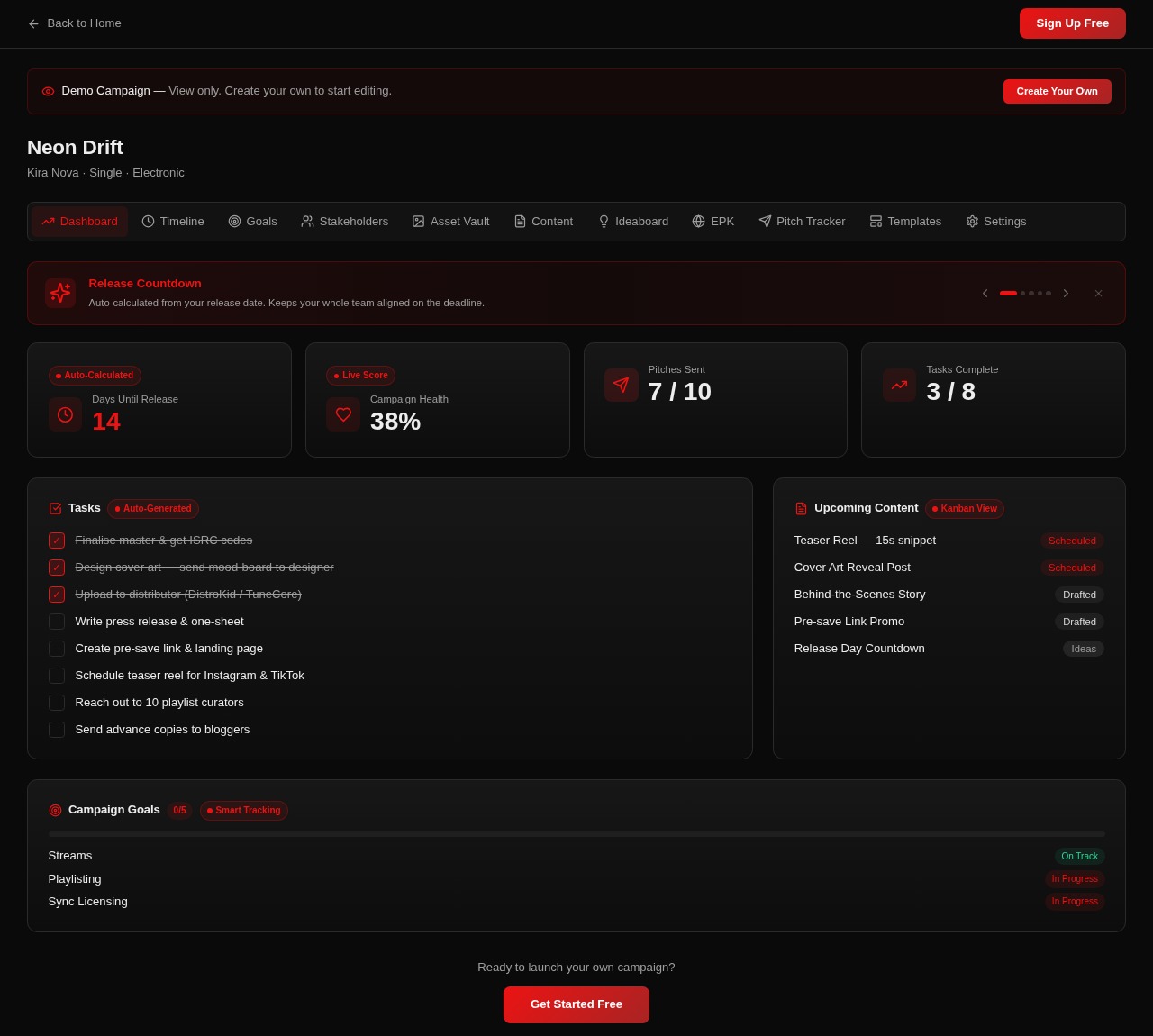
Keep the post ideas in the content planner as you develop the captions and prepare the assets. The public demo (opens in a new tab) shows how a release countdown, checklist and upcoming-content cards sit together, including teaser reels, pre-save promotion and release-day content. You can see the next piece of the rollout without reconstructing the whole campaign from memory.
For a solo artist or producer who wants one place to organize a music campaign, Sampledex Release is the option I would start with here. Asana remains a good choice for a team already managing broader work there; Slack is the conversation layer. Release’s strength is keeping the planning centered on what you are putting out.
Explore Sampledex Release (opens in a new tab) or open the demo (opens in a new tab) to see that workflow. Prefer working locally? The separate Mac edition (opens in a new tab) offers an offline desktop workspace. This guide’s walkthrough and screenshot refer to the web version; use it as your campaign planner, with publishing handled through your social accounts or chosen publishing service.
How do you connect the tools without duplicating everything?
You do not need to maintain the same calendar in three places. Give each tool a distinct job:
- Campaign context: keep the release date, campaign milestones and overall plan in your chosen release workspace.
- Content execution: use one calendar or task board as the authoritative place for individual posts, owners, asset links and status.
- Conversation: use Slack for questions, approvals and quick coordination. Put the final decision back into the relevant task.
Start with Sampledex Release as the home for your rollout and content plan. Add Asana when your team needs a separate production workflow—not simply to copy the same posts into another board. Use Slack for discussion when collaborators are involved; a solo artist can keep the setup much leaner.
For example, an editor finishes a vertical performance clip and links the approved export in its task. The artist reviews it, confirms the caption, and the owner marks it ready. At the planned time, the publisher uploads it—or uses a separately verified publishing scheduler—and adds the live URL. “Ready” and “published” are different states.
Make permissions part of the plan. Avoid putting passwords in Slack messages or public task descriptions. Give collaborators only the access they need, and decide who is authorized to publish on the artist’s account.
What should you measure each month?
Start with the objective, then choose a result you can actually observe. A listening invitation might be judged by tracked link clicks. A tutorial might be judged by saves and substantive questions. A show announcement might be judged by ticket-link activity or sales your ticketing service can attribute.
Views, likes, comments, saves and shares describe different behavior. They are not interchangeable, and not every platform exposes the same measurements. A click is not automatically a stream or a sale. Keep the reporting honest.
At your monthly review, record:
- Which topics and formats produced useful responses.
- Which posts were easiest to finish without disrupting the music.
- Which calls to action were clear and led somewhere current.
- Where delays happened: filming, editing, approval or publishing.
- One change to test next month—not ten changes at once.
Compare similar posts when possible. Do not declare a magic posting hour from one unusually successful clip. Use your own audience information to test times and keep the calendar flexible.
How do you get started this week?
Choose one platform, three content pillars and a sustainable posting rhythm. Add the next two weeks to a calendar. Capture your first batch, attach the approved files, and decide who publishes each post. Set a short weekly review so unfinished tasks do not disappear.
For a release, connect that routine to your music release calendar. Keep your bio, photos and contact information ready with an EPK, so a promising conversation has somewhere useful to go.
The system should make the next post easier—not turn your music career into a meeting about posting. Start small, repeat what you can sustain, and let the calendar support the creative work.
Frequently asked questions
Do musicians need to post every day?
No. Daily posting is not a requirement for a workable calendar. Choose a schedule you can maintain, assess the audience response and production effort, and increase frequency only when it serves your goals.
Is a posting calendar the same as a social media scheduler?
No. A calendar organizes the work and intended dates. A scheduler actually publishes supported formats to connected accounts. Verify publishing support separately; a task reminder or calendar entry does not upload a post.
Should I use Asana, Slack and Sampledex Release together?
No—you do not need all three. Sampledex Release is a strong starting point for an artist or producer organizing a music rollout, with the content plan, release milestones and outreach in one workspace. Choose Asana if it already suits your team’s task management, and add Slack when you need a place for collaborator discussion.
What if I miss a posting day?
Move or cancel the entry, tell anyone waiting on it, and identify the bottleneck. Reduce the schedule if missed deadlines become a pattern. A sustainable two-post week is more useful than an ambitious calendar you never complete.