 SAMPLED
Spotify AI Music Policy: Disclosure, Rules, and Royalties [2026]
Spotify’s 2026 AI music rules explained: optional credits, voice-cloning limits, AI Persona badges, spam enforcement, and recording royalty eligibility.
Spotify allows AI-assisted music, but that does not mean anything generated with AI is automatically cleared, recommended, or paid. Its rules distinguish creative tool use from unauthorized voice impersonation, spam, and misleading artist identities. In 2026, AI credits are also available in beta through participating distributors—and Spotify says those credits are optional, not a universal upload requirement.
This guide is based on Spotify’s September 25, 2025 announcement, “Spotify Strengthens AI Protections” (opens in a new tab), including its subsequent AI-credit update, and Spotify’s current artist-support pages, checked November 10, 2026. It is independent editorial coverage, not a hands-on review or a company-requested announcement.
What is Spotify’s AI music policy in 2026?
Spotify’s position is not a blanket ban on music made with AI. The company says artists should decide whether and how to use AI, while it protects against impersonation, spam, and deception. Its announcement says licensed music is treated equally regardless of the tools used to make it, with royalties based on listener engagement.
For a musician, there are separate questions to answer: Do I have the rights to release this recording? Have I supplied accurate credits and identity information? Does the recording qualify for royalties? Upload acceptance alone does not answer all three.
| Area | What Spotify says | What to do before release |
|---|---|---|
| AI contributions | Optional, role-specific AI credits are in beta through certain distributors | Ask your distributor which credit fields it supports |
| Voice impersonation | Unauthorized replicas of another artist’s voice can be removed | Obtain permission; do not treat an “AI version” label as clearance |
| Spam | The announced filter targets mass uploads, duplicates, SEO abuse, and similar tactics | Release distinct work with accurate metadata, not a bulk-upload scheme |
| AI artist identities | AI Persona badges concern photorealistic AI-generated human identities | Check whether your presented artist identity falls within that policy |
| Recording royalties | At least 1,000 streams in the previous 12 months plus a nonpublic minimum of unique listeners | Check distributor royalty statements; a public stream count is not a payment guarantee |
Sources: Spotify’s AI-protections announcement (opens in a new tab), AI credits (opens in a new tab), voice policy (opens in a new tab), AI Persona guidance (opens in a new tab), and monetization eligibility (opens in a new tab).
Do you have to disclose AI-generated music on Spotify?
Spotify’s current AI-credit guidance says the credits are optional. They identify individual AI-generated contributions rather than labeling an entire recording “AI” or “not AI.” Examples include lyrics, vocals, instrumental performances, and production. When human and AI contributions exist in the same role, Spotify says to credit them separately.
The original 2025 announcement described a developing disclosure standard through DDEX, an organization that develops music-industry data-exchange standards. Its updated newsroom page says Spotify launched an AI-credit beta on April 16; the current support page confirms that the feature remains in beta. That distinction matters: the original announcement was a plan, while the support documentation describes the feature available now.
How do you add AI credits?
You submit them through your distributor when uploading your music, not by adding “AI” to the song title. If your distributor supports the beta, mark the relevant roles and submit the information with your release. Spotify says listeners can currently see AI credits on mobile in Song Credits and Now Playing; they are not artist-profile badges or whole-track labels. Ask your distributor about support and corrections for an existing release. Spotify AI-credit instructions (opens in a new tab).
A useful message to send is: “Does your Spotify delivery support AI credits? My release includes AI-generated [lyrics/vocals/instrumental performance/production] alongside human contributions. Which fields should I complete, and can you update those credits after delivery?”
No AI credit does not prove that no AI was used. Spotify depends on disclosure from artists and their delivery partners, and not every distributor supports it. Its announcement also says the disclosure initiative is not intended to punish responsible AI use or down-rank tracks for disclosing how they were made. That is not a promise that every AI-related release will qualify for recommendations under every other policy.
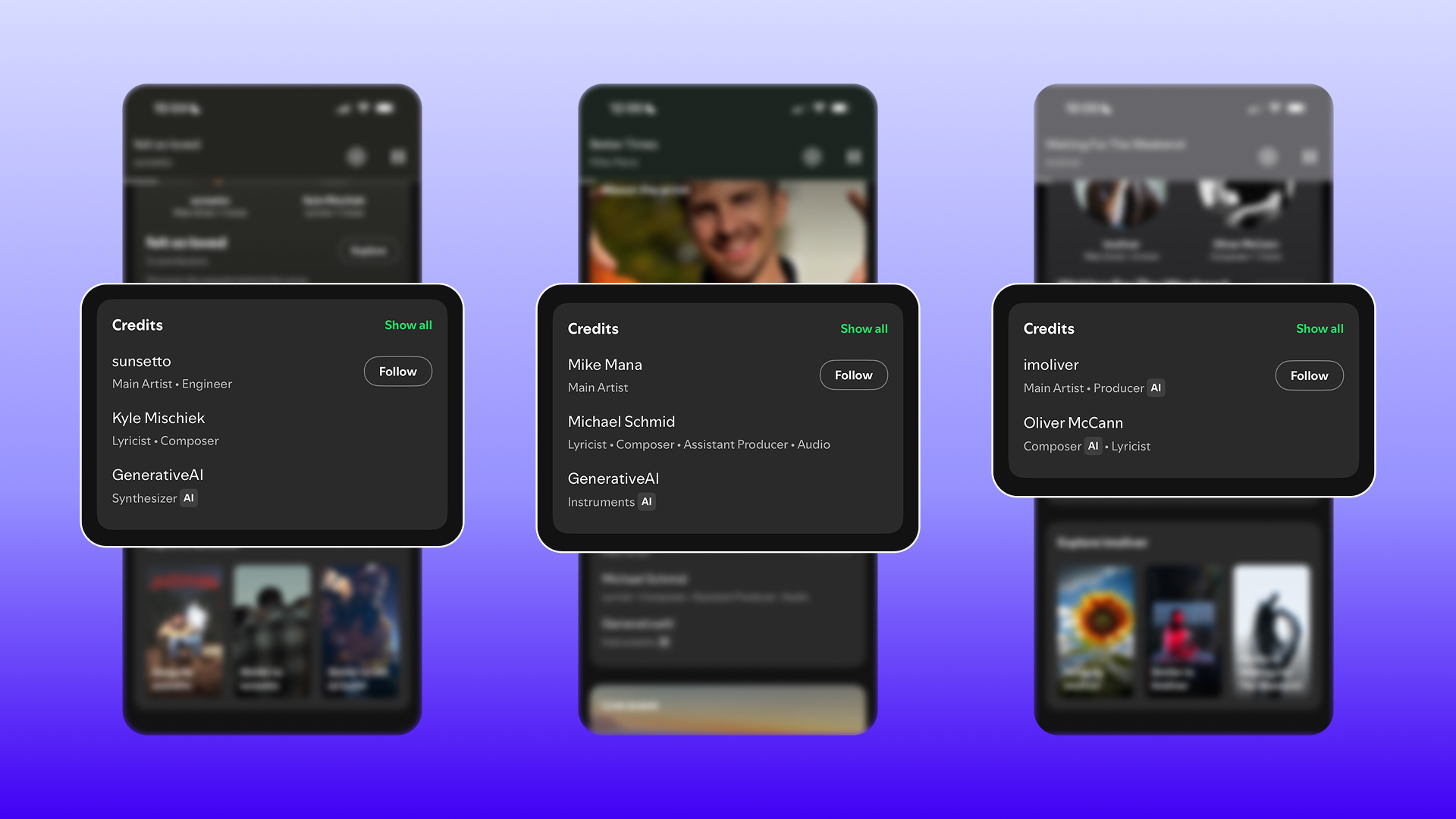
Screenshot: Spotify Newsroom. Official examples reproduced for reporting on the AI-credit feature; individual roles carry AI indicators. Source (opens in a new tab).
Can you upload an AI clone of another artist’s voice?
Not simply because you disclose it. Spotify says it removes music that replicates another artist’s voice without permission, whether the replica is made with AI or another method. The policy covers releases presented as an “AI version” of the artist and recordings that omit the artist’s name but clearly reproduce their exact recognizable voice. Certain forms of parody are exceptions, but that is not a general permission slip for commercial voice clones. Spotify’s impersonation policy (opens in a new tab).
Disclosure is not consent. Before distributing an authorized voice project, retain written permission describing the permitted use. Also check the rights in the recording and composition: permission to use a voice does not, by itself, clear a sampled recording or someone else’s song.
If someone clones your voice, Spotify instructs the artist or their representative to use its legal reporting form (opens in a new tab) and select Publicity / Likeness. Spotify needs a claim to establish that the use was unauthorized. If the problem is unrelated music delivered to your artist profile, use its separate content-mismatch process (opens in a new tab).
What counts as AI music spam?
The September 2025 announcement identified mass uploads, duplicates, SEO hacks, artificially short-track abuse, and other spam tactics. Spotify said its new filter would identify and tag offending uploaders and tracks, then stop recommending them, with a conservative rollout and evolving signals. It also reported removing more than 75 million spammy tracks during the preceding 12 months. That was a historical figure in that announcement—not a 2026 total, and not a claim that all those tracks were AI-generated.
The practical distinction is between using AI to create a recording and using automation to manipulate the platform. Do not confuse a creative workflow with a release strategy built around near-duplicate uploads or misleading metadata. The announcement does not publish a “safe” number of daily AI uploads, so there is no verified numerical upload limit to recommend here.
Are AI Persona badges the same as AI credits?
No. AI credits describe how parts of a recording were made. AI Persona badges describe the artist identity presented to listeners, specifically an AI-generated photorealistic human. Spotify says the badge does not apply merely because a real artist uses AI in music, or because an artist uses a stage name or a fictional character that is not an AI-generated photorealistic person.
Artists can self-disclose in Spotify for Artists under Artist Settings → Profile & Identity → AI Persona. Spotify can also apply a Likely AI Persona badge after reviewing a profile, with an appeal process if the decision is wrong. The badges are gradually rolling out. Importantly, Spotify says music from AI Personas is not included in editorial or personalized recommendations unless a listener intentionally engages with the artist, such as by following them. This is a separate recommendation rule—not a penalty for adding a role-specific AI credit. Spotify’s AI Persona guidance (opens in a new tab).
Can AI-generated music earn Spotify royalties?
AI involvement alone is not a separate royalty rate or an automatic disqualification in Spotify’s announcement. But an eligible, licensed recording still has to comply with the applicable rules, and what reaches your account depends on your distribution and rights agreements.
Spotify explains two payment paths:
- Recording royalties go to recording rightsholders through the licensor that delivered the music, usually a label or distributor.
- Publishing royalties relate to the composition and go through publishers, collecting societies, and mechanical agencies according to territory.
Spotify uses streamshare, not a fixed payment per stream. Your distributor’s statement—not an online “Spotify pays $X per play” calculator—is the best place to check actual recording earnings. Spotify’s royalty explanation (opens in a new tab).
What does the 1,000-stream requirement actually mean?
Since April 2024, each recording must reach at least 1,000 streams globally in the previous 12 months, plus Spotify’s undisclosed minimum of unique listeners, to enter the recorded-music royalty calculation. This is not 1,000 lifetime streams, and it is not an artist-wide total. Spotify says the threshold applies to each unique recording, technically each ISRC, subject to its own recording-categorization systems. The policy does not change the calculation of publishing royalties.
Spotify gives this example: a track receives 750 streams in its first calendar month and 500 in its second. Assuming it meets the other requirements, the second month’s 500 streams are included once it qualifies; the first month’s 750 are not paid retroactively. A recording can move into or out of eligibility as its rolling 12-month listening changes. Public artist statistics are estimates, not guarantees of royalty-eligible activity. Spotify’s eligibility rules and example (opens in a new tab).
Finally, platform policy is not a copyright ruling. Spotify’s announcement does not determine whether you own every right in an AI output or whether a tool’s terms permit commercial release. Read the tool’s license, clear any third-party material, and confirm your distributor’s AI-content rules before paying to distribute a project. Our AI music legality guide covers the broader distinction.
What should you check before releasing an AI-assisted track?
- List the generated contributions. Separate AI-generated vocals, lyrics, performances, and production from human work.
- Check your tool’s commercial terms and distributor’s policy. Spotify’s acceptance does not override either agreement.
- Clear voice and music rights. Keep written permissions and licenses; do not assume disclosure clears impersonation or samples.
- Ask about AI-credit delivery. Use the supported fields and keep a copy of the metadata you submit.
- Check the artist identity. An AI-generated photorealistic human profile raises a different question from AI-assisted audio.
- Avoid manipulation. Do not build a rollout around duplicates, deceptive naming, or manufactured listening.
- Read the royalty statements. Track each recording’s eligibility and payments rather than projecting a guaranteed per-stream return.
Spotify AI music policy FAQ
Does Spotify ban all AI-generated songs?
No. Its announcement supports artists’ creative choices while targeting impersonation, spam, and deception. Distributor rules and third-party rights still matter.
Will an AI credit automatically reduce my royalties?
Spotify does not announce a separate AI-credit royalty discount. Actual earnings still depend on recording eligibility, listening, rights ownership, and your agreements. AI Persona recommendation restrictions are a separate issue.
Does writing “AI cover” make a cloned voice acceptable?
No. Spotify’s voice policy explicitly includes releases presented as an “AI version” of a real artist when the voice replica is unauthorized, subject to its stated exceptions.
Can I edit AI credits directly in Spotify for Artists?
Spotify’s current instructions route AI music credits through your distributor. Spotify for Artists has a separate self-disclosure setting for AI Personas.
Does reaching 1,000 streams guarantee a payout?
No. The window is the previous 12 months, there is an additional unique-listener requirement, and the visible count may differ from royalty-eligible activity. Check your label or distributor’s statements.